
Today is a big day, M5 Day! I say this because I believe M5 is a bigger deal than the products it’s in. That’s not to say these products are bad, quite the opposite: they are so good and have been so good for so many years that it’s hard to think of anything meaningful to say. The iPad Pro is the best tablet on the market. The MacBook Pro is the best all around $1600+ laptop on the market. For the iPad Pro, that’s been true since 2018 and for the MacBook Pro that’s been true since 2021.
I’ve been really enjoying both of the M5 versions of these! The iPad Pro with N1 and C1x for connectivity has made it more reliable for me compared to my M4 iPad Pro, and helping with battery. I’ve actually noticed that the 11-inch version with M5 about matches my 13-inch iPad with M4! The MacBook Pro, well, it’s just great to have a smaller laptop for travel and work. I adore the 16-inch MacBook Pro and M3 Ultra Mac Studios I regularly use at home and traveling when needed, but frankly I’ve been looking for a smaller travel laptop with good performance. The 14-inch MacBook Pro with M5 is that laptop. Simply, great products.
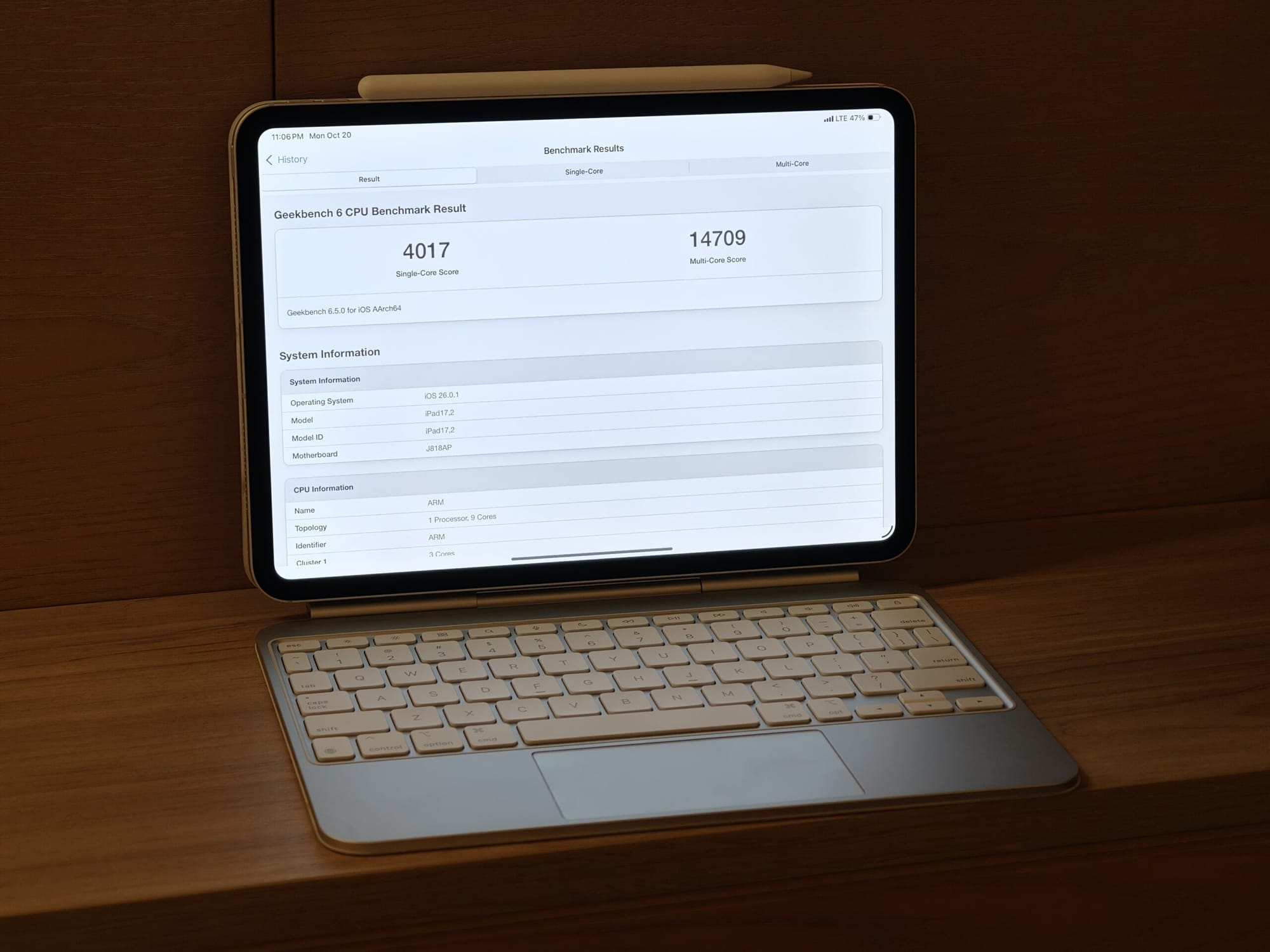
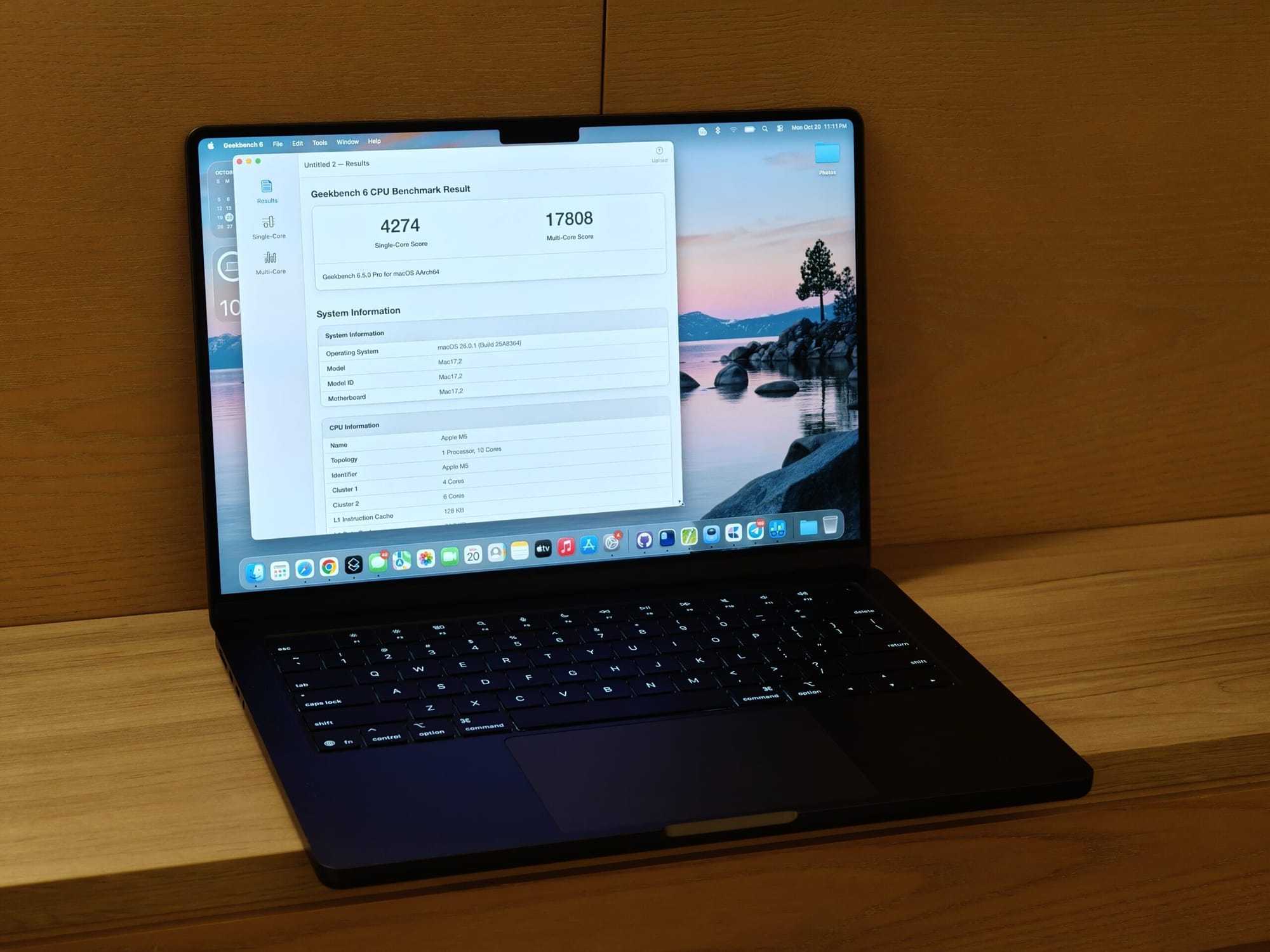
Beyond how I use these things, what has really changed is the silicon. With this generation and M5, I think it’s one of the larger changes in recent history for Apple Silicon! Let’s talk about it in 3 parts: CPU, GPU, and cache!
CPU
The M5 CPU has some pretty big IPC gains! It’s roughly 10% IPC gains when normalized for maximum clock speed, if we just look at raw single core performance increase it’s roughly 15%. This is thanks to the higher 4.6GHz clock speed on the performance cores! This leads us to roughly a 4,300 single core score in Geekbench 6.5. Apple’s M4 SoC was around 3,800 single core performance in Geekbench 6.5. If we look at score per GHz, it’s about 872.8 for M4 and 950.3 for M5. The largest jumps in performance were Object Remover +28%, Background Blur +23%, Structure from Motion +22%. These workloads are sensitive to memory/latency and vector throughput, so the larger cache (more on that later) and memory bandwidth are helping here. This is likely also being helped by Arm’s SME (scalable matrix extensions) as Neural Accelerators within the CPU cores.
What we also see is a nearly 25% increase in multi-core performance! In Geekbench, the multi-core is 18,086 on M5 vs 14,546 on M4. This increase is more than we would see if it were just IPC improvements and clock speed, which means M5 also improves upon multi-core scaling. This is likely due to M5’s cache (again, more on that later) and wider front-end bandwidth.
With all of these improvements, M5 CPU about matches the performance of M1 Ultra!
GPU
The GPU has what I’d consider the largest upgrade this year for Apple Silicon. It was introduced with the A19 series in iPhone 17 series and now M5!
This GPU architecture comes with a new 3rd ray tracing accelerator, new shader core, and Neural Accelerators! These neural accelerators are similar to Nvidia’s tensor cores, specific cores optimized for matrix multiplication.
All AI models, regardless of the type, are bundled into matrixes. For Qwen3 1.7B, for example, it’s a 2048×2048 matrix for most layers. There are two ways to calculate this math, using vector cores or matrix cores! The vector way (regular shader ALUs) treat the grid like lots of 1×2048 lines (dot‑products). It works, but you keep re‑loading data, so it wastes bandwidth and time. Each GPU cores is able to calculate more than one of these at a time, so the more cores the faster it can go, with limitations based on memory bandwidth. The matrix way (the GPU’s neural/matrix units) chop the grid into small squares (think ~32×32 or 64×64). Each GPU core multiplies those squares and reuses them while they’re on‑chip, so far fewer memory trips and lots of squares processed in parallel. On M5‑class chips, each GPU core has a Neural Accelerator specifically for this.
These dedicated neural accelerators in each core lead to that 4x speedup of compute! In compute heavy parts of LLMs, like the pre-fill stage (the processing that happens during the time to first token) this should lead to massive speed-ups in performance! The decode, generating each token, should be accelerated by the memory bandwidth improvements of the SoC.
Now, I would have loved to show this off! Unfortunately, full support for the Neural Accelerators isn’t in MLX yet. There is preliminary support, though! There will be an update later this year with full support, but that doesn’t mean we can’t test now! Unfortunately, I don’t have an M4 Mac on me (traveling at the moment) but what I was able to do was compare M5 performance before and after tensor core optimization! We’re seeing between a 3x and 4x speedup in prefill performance!
For the currently available MLX without neural accelerator support comparing M4 to M5, you can see the results below! When MLX is updated with Neural Accelerator support later this year, you can expect a much larger jump like we see above.
There’s a pretty big boost in gaming performance as well, but I’ll leave that for others to review/benchmark! I just think AI performance in GPU is most interesting for now. This is just the beginning of what we’ll see as the neural accelerators are supported in more AI applications.
Cache
Cache is what is basically Apple’s secret sauce for efficiency and performance. CPUs need access to memory to function, otherwise how would it know what to process! There are two types of memory, DRAM and SRAM, in a system like this. SRAM is used for system cache while DRAM is used for the Unified Memory, your usual LPDDR_ or DDR_. SRAM is very low density and requires more space, so it’s included in the SoC as a cache as your usual L1/L2/L3 and SLC (system level cache).
When a CPU processes data, it pulls that data from your memory (DRAM) and stores it in the cache (SRAM) to process. Pulling from data from DRAM to SRAM is very energy intensive, generally hundreds of pJ (pico joule) per read from DRAM. Reading and using the SRAM is generally single digit pJ. Having more cache effectively means less reads from memory, this ends up lowering power consumption!
With A19 Pro and M5, Apple has loaded up the SoC with cache. There’s more L2 cache per CPU cluster, more SLC among the entire SoC! This has two net benefits we’ll see as an extension of the CPU performance we talked about earlier, the CPU’s P-cores are more efficient while the E-cores remain effiecent but allow Apple to make them more performant. This also means that if the SoC uses less power, you’re able to put more power into it increasing performance! Performance is generally a limitation of heat from power, if your CPU uses less power to complete the task, it heats up less, meaning you can put more power into it to increase performance.
This is worth noting for a few reasons, but mainly a foundry reason: large cache is expensive. If you want 32MB of SLC in a chip like A19 Pro, your die must be larger to fit it all. Unlike transistors, SRAM density doesn’t shrink as often or at the same rate. While transistor density improved over TSMCs 3nm process, SRAM density did not increase as much over the process. By all intents and purposes it’s roughly the same. That means that if Apple took the same ~105mm^2 for A18 Pro and ~140mm^2 for M4 and were able to shrink transistors 15%, they could have either taken that space as cost savings per die by making it smaller or keep the same size and increase efficiency with more die space allocated to SRAM for A19 Pro/M5. Apple chose the latter, meaning they value efficiency above cost for chips like this. I believe this is a philosophically important point to make.
Apple doesn’t always make this trade off, for example A19 in the lower cost iPhone 17 and likely iPhone 17e next year didn’t increase cache size and did reduce die size! In this case, Apple decided to reduce cost because the products this chip was going into didn’t require the same efficiency benefits as the products A19 Pro and M5 were going into. Those are cheaper products designed for higher margins and more unit sales. It’s a valid and smart trade off to make for that chip and product.
Ok overall, M5 is really good. The new iPad Pro is really good. The new MacBook Pro is really good. The reality is were in this weird spot where I’m not really sure how these products could get much better. Maybe slightly thinner and lighter MacBook Pro with cellular data, maybe better battery life on the iPad Pro. M5 is continuing Apple’s trend of more performant chips with better efficiency. Apple is more or less class leading in this. As we get into a power constrained future for AI, as Apple builds out their own Private Cloud Compute, and as some smaller edge AI workloads becomes more important, these changes add up!