
The Asus Zenbook A16 is the first premium Snapdragon laptop, if you buy the right one
Normally I don’t talk about specs in a review. The spec sheet is not the product. The overall experience is the product, and the overall experience on this laptop is good. Not my favorite in the world, but good. I’m breaking my rule this time because the person considering this laptop is the most spec-driven, value-driven buyer in the market. This is a MacBook Air style machine, and MacBook Air cross-shoppers do math, but focused on performance over all else.
So let’s talk about the Zenbook A16. It is the only laptop on the market shipping Qualcomm’s Snapdragon X2 Elite Extreme, and it’s a machine I’ve been waiting on for a while, because it was described to me as the first extremely premium feeling Snapdragon laptop. That description matters. My problem with the Snapdragon X Elite generation was never the chip. If you were handing me any Windows laptop last year, I wanted that chip in it. The problem was the laptops built around it. They were less premium than I expected, and they weren’t machines I wanted to live on.
The A16 mostly fixes that. Mostly. There’s one thing ruining the experience for me, and it’s big enough that it decides which version of this laptop you should buy. We’ll get there.
The specs, because this time they matter
My unit: Snapdragon X2 Elite Extreme, 48GB of RAM, 1TB SSD, and a 16-inch 3K (2880 x 1800) Lumina OLED at 120Hz. The panel does 500 nits in SDR, 1,100 nits peak in HDR, covers 100% of DCI-P3, and carries VESA’s DisplayHDR True Black 1000 certification. It’s a very good screen in a very light machine: 2.56 pounds in this configuration, 2.87 in the one I’ll tell you to buy instead. For reference, a 13-inch MacBook Air is 2.7 pounds. This is a 16-inch laptop that weighs less than Apple’s small one.
Pricing is where it gets weird. Best Buy sells this with a touchscreen for $1,699.99. Asus’s own store sells it without one for $1,999.99. That sentence sounds backwards. It isn’t, and the reason why is the single most important thing to understand before you buy this laptop. Hold that thought.
The MacBook Air of Windows laptops
Asus mentioned to me that the internal codename for this machine was the Zenbook Air. They wanted to call it that and didn’t, but the intent survives: this was designed very specifically to compete with the MacBook Air, and I think it does a really good job at it. It’s light, it feels nice in the hand, and the demographic it targets gets more performance than an Air at similar money. The 15-inch M5 MacBook Air starts at $1,299 with 16GB of memory and 512GB of storage. Spec one up toward what the A16 ships with and the price gap mostly closes, while the Zenbook is sitting there with 48GB of RAM and 18 CPU cores.

Could I go spec by spec between the two? Sure. I don’t think it’s worth it. The reality is that anyone who buys either this or a MacBook Air is going to be extremely happy, and that’s all that really matters. If you build a product where someone walks out of the store with this instead of the Air and has zero regrets, you succeeded. Asus has done that here.
A lot of people want to hear that it’s better than the MacBook Air. I don’t think that’s fair to say. In some ways it is, in some ways it isn’t, and by all intents and purposes the two are relatively equal. That is exactly what you want from a competitor. Nobody has managed it against the Air in years.
Single-core is why it never feels slow
The machine itself is more or less last year’s Zenbook S formula: a new Ceraluminum mix, slightly different design tweaks, roughly the same shape. The reason this laptop is interesting sits on the motherboard, and frankly the Snapdragon X2 Elite Extreme is the most important part of this thing.
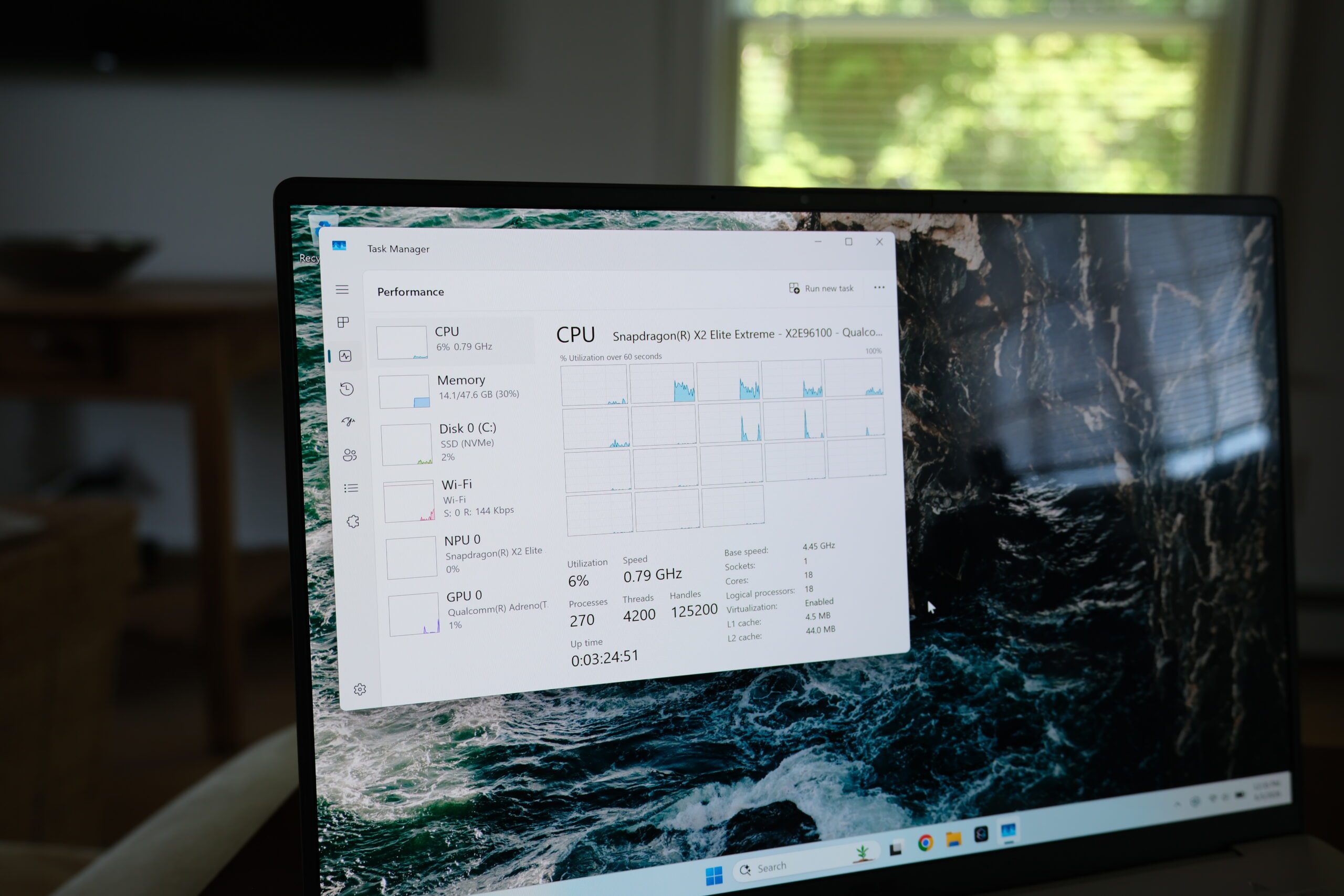
I’m a huge fan of this chip, and the reason comes down to one number most spec sheets bury. My problem with most Windows laptops is that they feel slow, and the thing that makes a computer feel slow is almost always single-core performance. Every time you open an app, a single thread does that work. Multi-threaded performance is a different job: that’s many cores grinding through one workload together, like a video render using all 18 cores on a single frame. What your day actually looks like is lots of separate single threads. Chrome runs one thread loading the page while another handles the content. Each of those threads has to be fast on its own, because any one slow thread drags the feel of the whole machine down with it.
The X2 Elite Extreme’s single-core performance is so high that this thing never feels slow. The chip pairs 12 prime cores with 6 performance cores, and my unit lands at 3,821 single-core in Geekbench 6. Numbers in isolation are useless, so below is that score next to the chips this machine actually gets cross-shopped against, Apple’s M5 and M5 Pro, Intel’s Core Ultra X7 358H, and AMD’s Ryzen AI 9 465, each from the thin-and-light laptops they ship in.
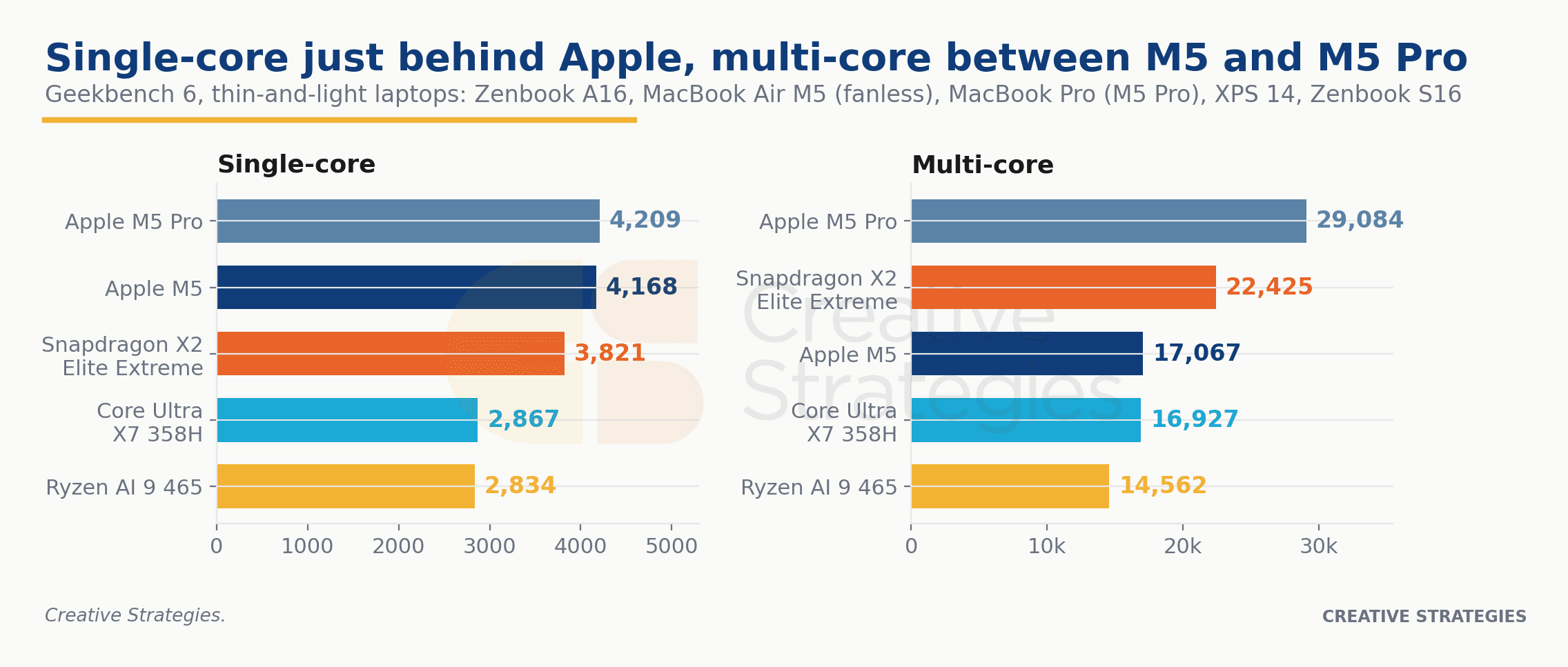
Apple keeps the single-core crown. The fanless M5 MacBook Air sits at 4,168 and the M5 Pro at 4,209, both roughly 10% ahead of this chip. The real story is the x86 column. Intel’s and AMD’s current thin-and-light flagships land at 2,867 and 2,834, which hands the X2 Elite Extreme a 30-plus percent lead over both on the one metric that decides how fast a laptop feels. The x86 establishment is now a third behind on the thing that matters most.
Multi-core is where the placement gets interesting. The 18 cores put up 22,425 on my unit, and that lands the chip exactly where I’d describe its overall performance: between the M5 and the M5 Pro. It clears the MacBook Air’s 17,067 by more than 30% while the M5 Pro’s 29,084 stays out of reach, the Core Ultra X7 sits just behind the Air, and the Ryzen trails at 14,562. It also sustains. Loop Cinebench 2026 and this machine opens around 6,300 and holds right around 6,000 run after run, while the fanless MacBook Air opens at 3,415 and settles into the low 2,300s, and the Intel X7 machines hold somewhere between 4,000 and 4,500 depending on the chassis. A thin 16-inch laptop sustaining two and a half times a MacBook Air’s multi-core throughput is the kind of thing that was supposed to be impossible on Windows on Arm two years ago.
Is the M5 Pro the better chip? Probably. It’s also a chip whose cheapest home is a $2,199 MacBook Pro, while this laptop is $1,699 with twice the base RAM. That’s the framing that matters. The M5 Pro buys you a different class of machine, not a better version of this one. In the class the Zenbook actually lives in, the big thin-and-light under $1,800, the X2 Elite Extreme is the best chip you can buy. Intel and AMD aren’t close, and Apple doesn’t sell this much multi-core anywhere near the price.
Living on Windows on Arm
It’s not a secret that I’ve been doing a lot of development work lately. I hate the term, but I’ve been playing around with vibe coding, building my own agents, and getting to understand how this stuff works at a pretty deep level. When I’m doing that work, the only machine I reach for now is the Snapdragon one. Installing JavaScript modules with Bun is faster. The first compile on an Electron app is faster than on any other Windows laptop I have around. And supporting Arm as a developer is genuinely not hard anymore; for my projects it is literally adding a win-arm64 target next to win-x86 in the build config.
There is one exception, and it’s a good example of the remaining rough edge. OpenAI’s Codex app doesn’t ship an Arm-native version, so it tries to run in an x86 sandbox, and that doesn’t work. I can use Codex from the command line just fine, but the app is really good and I can’t use it, which is disappointing. I’ve asked OpenAI about it. They said they’ll support it at some point. Who knows.
That’s the uncommon case, though. Almost everything I’ve put on this machine runs natively on Windows on Arm now, and the apps that don’t run fine emulated. Even some games hold up. My favorite test is Overwatch, which on this machine actually outperforms a lot of the x86 laptops I’ve had around when running DirectX 12. I could not tell you why. It doesn’t entirely make sense, but it’s repeatable, and it’s really cool.
The on-device AI story
There is none. I mean that almost literally. The NPU exists, it does 80 TOPS, this is a Copilot+ PC, and the features are all here. I don’t notice them. The semantic file search in File Explorer, where you describe the file you want and it finds it, is fantastic. Recall I keep around as a just-in-case and basically never open. Could live with it, could live without it.
I’ve been building some AI benchmarks to test this NPU, partly to understand what it’s like to develop and optimize a model for it. It’s a good NPU. It performs well. But watch where the industry is going: everyone is quietly moving AI workloads away from the NPU and back toward the CPU, because the CPU is what runs Claude Code, Codex, and everything in between. That shift plays directly to this chip’s strength. The reason this machine is great for AI work isn’t the dedicated AI silicon, it’s that the CPU attached to it is exceptional.
Boring is good
The GPU is fine. I have no complaints about it, and I didn’t pick this machine for graphics. The build, the thermals, the day-to-day: fine, fine, fine. I want to be clear that this is praise. If you get a laptop today and it’s boring, that’s a good thing. Nothing on this machine stands out as bad, a few things stand out as extremely good, and the stuff that annoys me daily on other Windows laptops, mostly slow-feeling CPUs, doesn’t exist here. I don’t want to be annoyed by my computer. This one doesn’t annoy me. That’s a better compliment than it sounds like.
The cover glass problem
Here’s the thing that ruins it, and here’s why the cheaper version at Best Buy is the one to get.
Asus sells two displays on the A16. The Best Buy model has a proper cover glass over the OLED and a slightly slower chip: its X2 Elite Extreme boosts to 4.7GHz instead of 5.0GHz. That 300MHz is negligible. You will never notice it (in Geekbench, my 5.0GHz unit scores within a rounding error of the 4.7GHz one, and actually came in a touch lower in multi-core). The model on Asus’s own website has the 5.0GHz SKU and no cover glass at all, which means a plastic border around the panel and a tacky plastic coating sitting on top of the OLED.
This is a terrible display to live with. It looks fine powered on, but touch it once, or let it pick up any oil or fingerprints, and it’s near impossible to clean. It looks cheap. Worse, the glass on a normal laptop is structural, and without it this display flexes with almost no force, the chassis flexes with it, and the whole machine feels like something you could break by picking it up wrong. Putting it in a backpack makes me nervous. Reflections and sunlight are harder to fight. And for the same RAM and the same storage, IT COSTS THREE HUNDRED DOLLARS MORE.
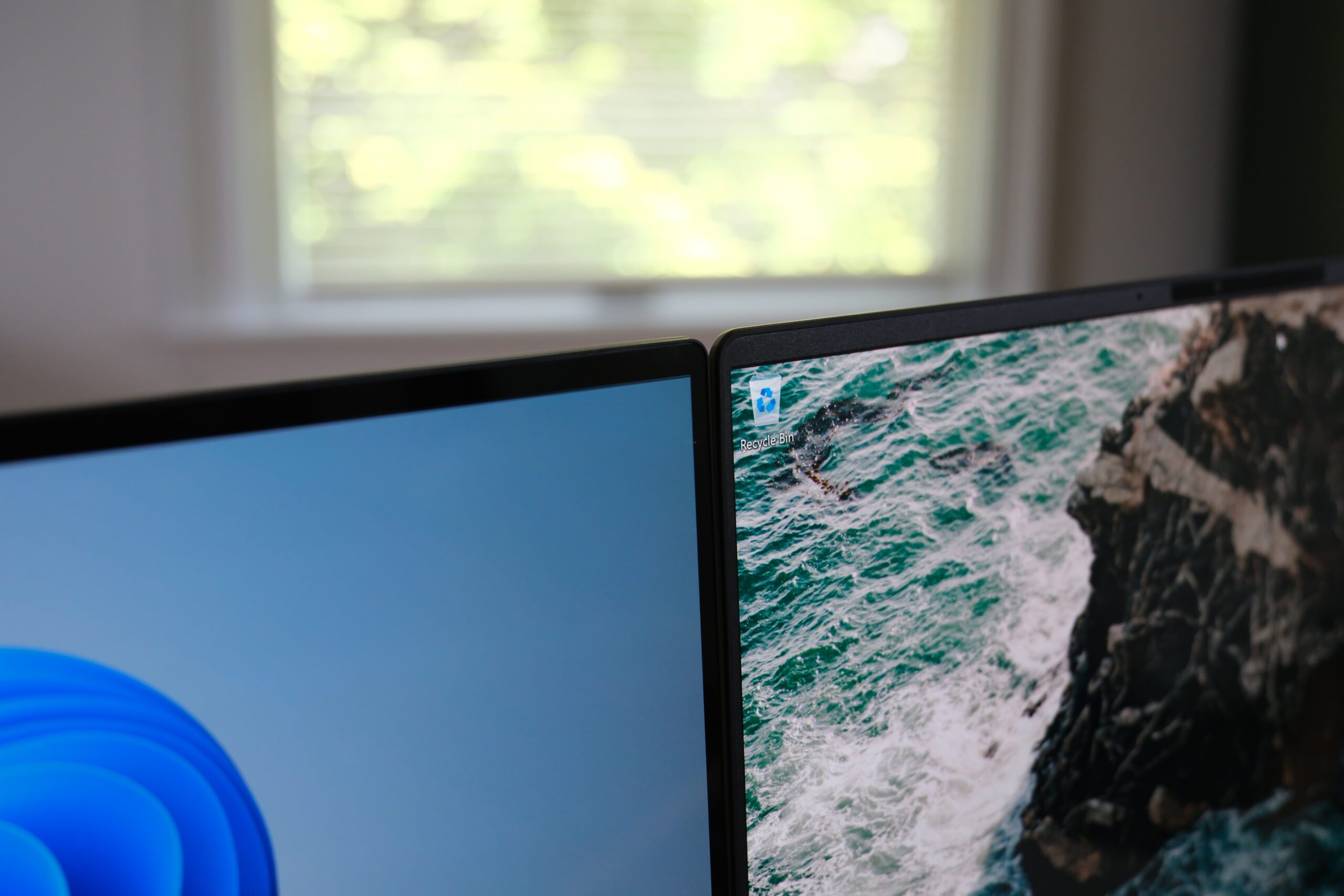
Right: 2026 Asus Zenbook A16 without cover glass
I don’t know why Asus shipped this version. I genuinely don’t. A display like this should not exist on anything over a thousand dollars, and on a two-thousand-dollar machine it is absolutely horrendous. The only version of this laptop anyone should ever buy is the Best Buy one, with the cover glass. The weight difference between the two does not matter.
I know how this sounds. It sounds like a massive nitpick. It is not a nitpick, and I want to explain why, because it goes to how I think about hardware in general. I care about tactile feel. When you sell a computer, the end user hardware matters more than anything else, not just the chip inside it. Performance matters, but everything together is what someone lives with. Earlier in this review I called this the first premium Snapdragon laptop, and for anyone who buys the Best Buy version, that’s true. It is not true of the unit on my desk. This machine does not feel premium. It feels hundreds of dollars cheaper than it costs, and that one missing piece of glass is the entire reason. This will likely sit on my desk unused because of it, which is a shame, because I like everything else about this laptop.
The small stuff
A few quick notes that didn’t fit anywhere else:
- The keyboard is actually pretty good. I tend to like Asus’s Zenbook keyboards, and this one keeps the streak.
- The trackpad is good. It’s not haptic, and I wish it were, but it’s a good size and it tracks well.
- The speakers are okay. Not great.
- The fans exist and you’ll occasionally hear them, but they’re not loud and they’re off most of the time.
What this means for Qualcomm
Analyst hat on for a minute, because this machine says more about the market than one SKU decision does.
This is the second generation of Snapdragon X laptops, and the year-over-year change isn’t really about the silicon. It’s about the OEMs. They’re adopting the platform more widely, trusting it with better designs, and putting real effort into the machines. Asus is the clearest example: the Zenbook A series, both the A14 and this A16, is exclusive to Qualcomm. The Zenbook S14 is Intel-only. The S16 is AMD-only. The variant of the Zenbook designed to be the lightest, thinnest, most Air-like machine in the lineup went to Qualcomm, and Asus was first to ship the X2 Elite Extreme and remains the only one shipping it. Last year the premium designs mostly skipped Qualcomm. This year it has a Zenbook line to itself. Yes, the OEMs still make mistakes, see: cover glass. The direction is what matters.
The Windows on Arm takeoff is happening now, and it’s about to get a second engine. NVIDIA showed up at Computex this week with RTX Spark, the N1X superchip, with laptops from Microsoft, Dell, HP, Asus, Lenovo, and MSI coming this fall. I keep hearing that this kills Qualcomm. I think that’s completely wrong, because the two aren’t in the same market. N1 systems reportedly won’t be priced below about $1,799, and N1X systems start near $2,899. The X2 Elite Extreme at the very top of Qualcomm’s stack lives in a $1,700 laptop. Qualcomm covers the volume of the market, from cheap consumer machines up to about $1,800. NVIDIA picks up from $1,800 to $3,000 and beyond, selling the one thing Qualcomm doesn’t have right now: a real GPU. Down in the volume segment you don’t need that GPU. You need a fast CPU, and Qualcomm now ships one of the best in the industry. Rising tides raise all ships here. Anyone arguing Qualcomm isn’t succeeding in PCs is reading the wrong scoreboard.
So, the verdict. The chip was never the problem, and with the Zenbook A16, the laptop mostly isn’t either. This is the best Windows on Arm machine I’ve used, the closest thing to a real MacBook Air competitor the Windows side has produced, and the home of the best CPU you can currently get in a thin laptop. If you want a big, light machine for real work and you don’t need a discrete GPU or macOS, I can’t think of a better option at the price.
Just buy the right one. The $1,699 Best Buy version with the cover glass is the premium laptop Qualcomm has been waiting two years for somebody to build. The $1,999 version on Asus’s website is the same laptop wearing a worse display, and it undoes the whole point. Asus built the first premium Snapdragon laptop and then, for three hundred dollars more, also sells you the version that isn’t.