
The Dell XPS 14 Is Back, and Dell Nailed It
I have had the new Dell XPS 14 for a few months now. Let’s get the big statement out of the way first: this is the first Windows laptop I’ve used in a long time that feels like they cared about the user experience.
Saying a Dell feels as nice and premium as a Mac is a huge statement. It’s also true. The MacBook Air and MacBook Pro are the benchmark for premium laptops. The XPS 14 lands somewhere between those two. It is thin and light like the Air, and premium in the way the Pro is. I have not felt that from a Windows laptop in about five years. Call it catching up if you want; I don’t care how long it took. We’re here now.
What Dell got right with OLED
When this laptop came out, there was something I wanted to test: how does battery on the LCD model compare to the Tandem OLED model. So, I asked Dell for two identical systems with the only difference being the panel.
I figured a lot of people would happily swap the fancy OLED for a cheaper LCD if it bought them a big jump in battery life. Save some cash, get four or five more hours, and accept a worse-looking screen. That felt like a trade real people would make, and I wanted to see it play out, especially as products become more expensive.
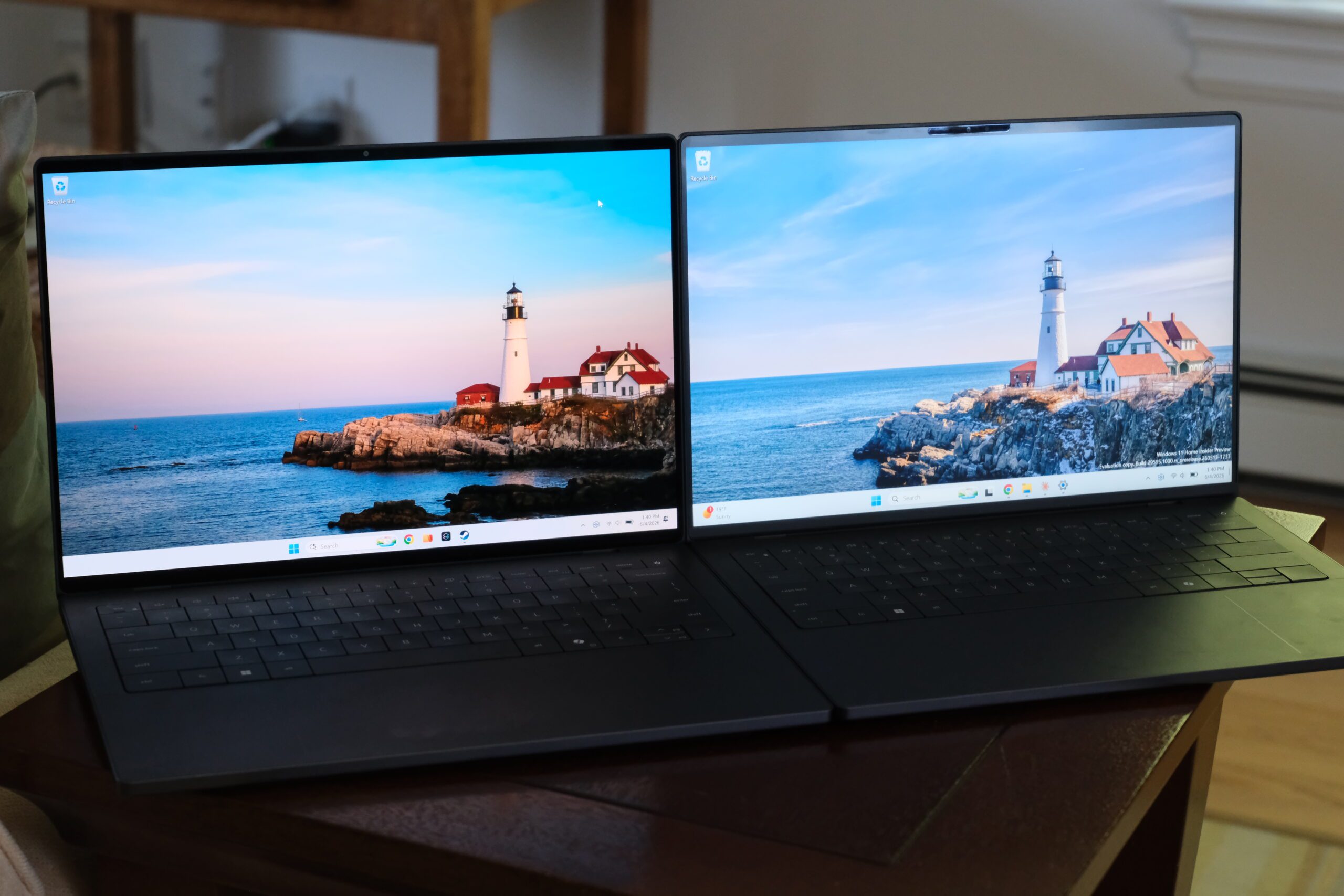
OLED on Windows has earned that setup. Run one of these panels at 120Hz and your battery can take a real hit, because somewhere in the display controller or the tuning the panel just chugs power. So much so that in some systems, running a panel at 120Hz can use more power than the SoC itself. So I tested the tandem OLED config against the LCD one expecting a bloodbath.
The gap was about an hour and a half, maybe two hours. That’s it.
On our battery benchmark, which runs real workloads in real apps at 35% brightness, the OLED ran about 9.9 hours and the LCD ran 11.7. That’s a difference of about 1.8 hours, or roughly 15%. This is Chrome, documents, Excel, File Explorer, RAW photo editing, and file movement, not looped video playback or an artificial browser-only test. Both panels were running at 120Hz, so nothing changed but the screen type, and a 120Hz OLED is the exact condition that normally wrecks Windows battery life. To see what that penalty usually looks like, I ran the same test on a Galaxy Book6 Pro and flipped it from 60Hz to 120Hz. That alone cost about three hours, closer to a third of the runtime. That’s the hit I came in expecting from the XPS, and it never showed up.
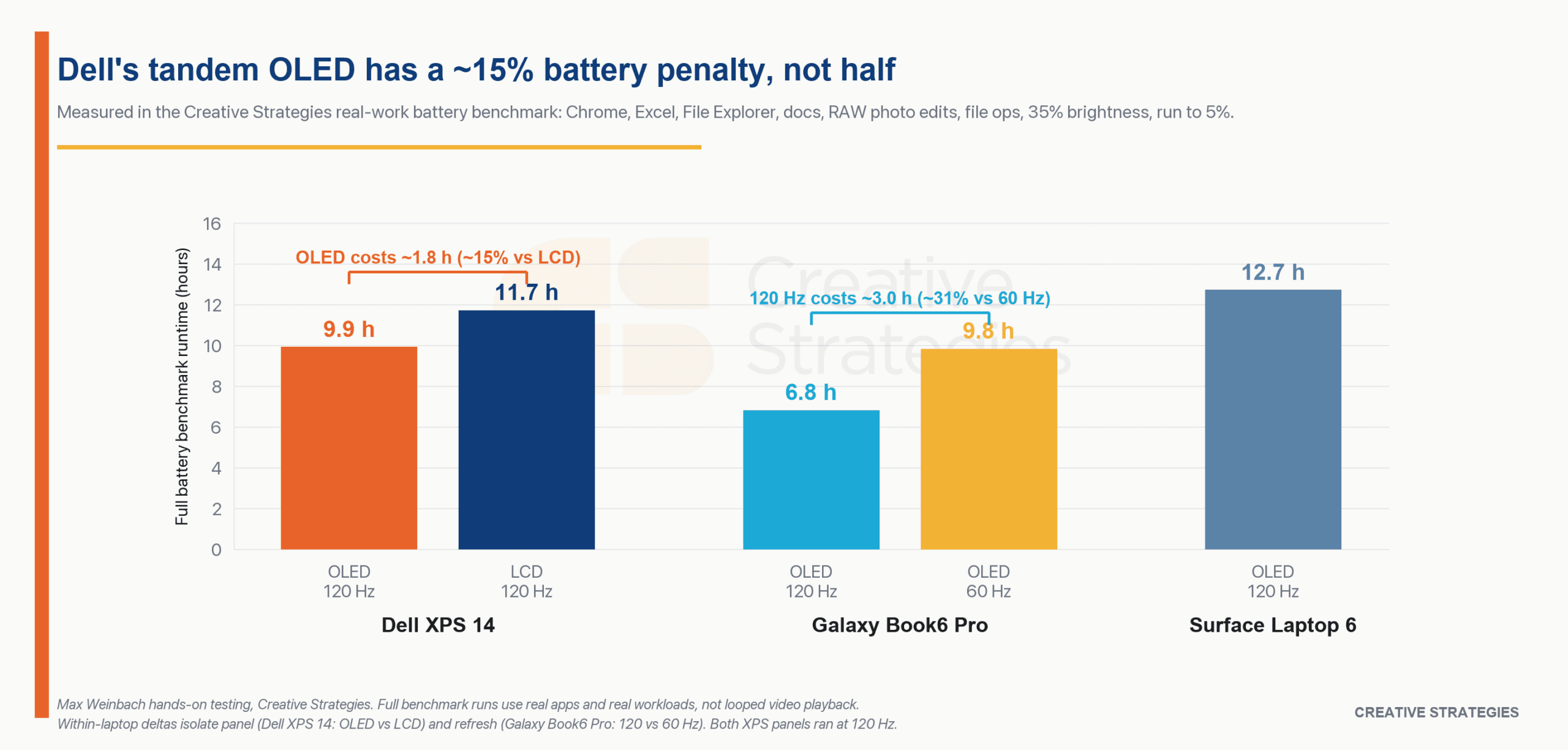
These are full battery benchmark runs to 5%, using the same real-work app sequence across the machines. I want to be careful with that distinction because this is much closer to how a laptop actually dies in a workday than the single-loop battery numbers most reviews lean on.
There is a bigger version of this coming. We are building out the comparison set around final shipping devices and this same realistic work model. Think browser tabs, docs, spreadsheets, RAW edits, file movement, and the kind of mixed day that actually kills a laptop. The XPS 14 is one of the first machines going through that process, and this early OLED-versus-LCD result is why I am interested in it. Originally I was holding this review to compare to a larger set of devices to really show how these all compare, but no time like the present! More coming soon.
I have never seen an OLED penalty this small on a Windows laptop. Not once. The reason it works is that Dell tuned this panel for efficiency instead of chasing a peak-brightness number, which is the same broad move Apple made with its own tandem displays. Apple has been the benchmark for efficient premium displays, and I had not seen a Windows OLED laptop answer that in my own testing until now. Dell answered it. The panel looks fantastic, it’s bright enough that I never once think about it, and it doesn’t gut your battery to get there.
So my clean little value story (buy the LCD, save some cash, win on battery) fell apart, because the honest answer is the OLED is good enough that I’d pay the premium for it. Dell nailed tandem OLED on Windows. That ruined the test I came in to run and made the laptop much more interesting in the process.
Why people buy premium laptops
Here’s the part I care about most, and it’s where we get a little more analytical.
I don’t think most premium buyers buy a spec sheet. They buy the overall product. The specs have to be there, of course; nobody wants a slow computer. But once you clear that bar, the things that decide whether a laptop feels worth the money are the things you touch. The keyboard. The trackpad. The weight in your bag. Whether the hinge opens with one finger. The sound it makes when you close it. None of that shows up in a comparison table, and all of it is most of the experience.
This is the lens the spec-warriors miss. You can line up a cheaper laptop with the same processor, or even a cheaper laptop with a better processor, and on paper the XPS loses. In the hand it wins, every time, because it’s a better laptop in all the ways the table doesn’t measure. Price-to-performance is a real way to shop, but it’s a gaming-buyer way to shop, and that’s a completely different person from the one this machine is for.
Gaming laptops pick a side. Gamers want the absolute most performance, so they’ll happily carry a heavy brick with cheap plastic and screaming fans to get it. Machines like the ROG Zephyrus or the Razer Blade pick a softer version of that same side, giving up a little peak performance for a thinner, lighter, nicer body. Both are real demographics. Neither one is the normal person who doesn’t care about any of this and just wants a laptop that is good.
Dell built a machine that matches what an end consumer wants, regardless of specs. The proof is simple. Hand this thing to someone, don’t tell them a single spec, and let them open it and type on it. I’d put money on the first reaction being “wow, that’s a really nice computer.” That’s the whole game.
Silent acoustics and cold laps
One of the biggest contributors to perceived premium value is fan noise and thermals. If the fans spin up and get loud when you’re in a meeting, it becomes embarrassing and quietly drains how premium a laptop feels.
The XPS 14 is one of the first Windows laptops I’ve used where the fans do not get loud. Dell reworked the cooling so it pushes air out the back and the sides instead of straight into your lap. The result feels Mac-like, because the thing stays comfortable to use on your lap.
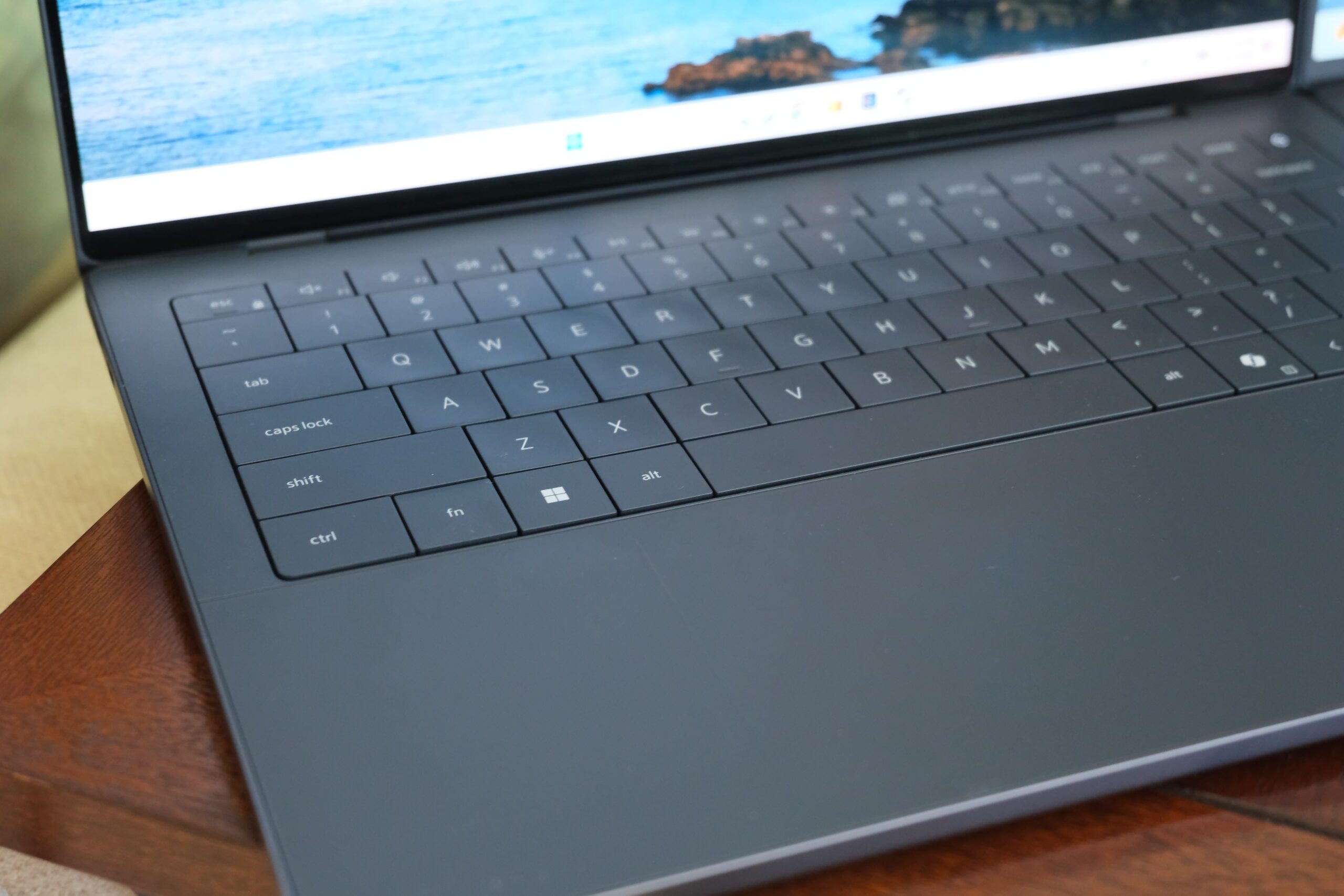
The keyboard is a pleasure to type on, and the haptic trackpad is massive and feels great. The one-finger hinge works perfectly, and the sound the lid makes when you close it feels expensive.
While there are some Windows laptops, especially those powered by Snapdragon chips, that tend to be quiet, those machines tend to lack the overall premium design I’m enjoying here. Again, first laptop that really gets me everything I could possibly want!
Panther Lake and the regular Apple M5
The unit I’ve been using is the XPS 14 with Intel’s new Panther Lake silicon, the Core Ultra X7. It is built on Intel’s 18A process, and it has the strongest integrated GPU I’ve used on a Windows machine. Yes, Strix Halo exists. I haven’t used it.
The Core Ultra X7 never feels slow. For years, the only Windows laptops that felt consistently snappy were the Qualcomm machines. Now I get that feeling out of an Intel chip. In the creative work I used it for, from RAW photo edits to video timeline work, it doesn’t stutter, and it feels as snappy as my standard Apple M5 machine.
The numbers explain why. In Geekbench 6, the XPS 14 is not close to the M5 in single-core, 2,801 versus 4,172, and that still matters for the instant-response feeling Apple is so good at. But the gap mostly disappears once you move into heavier work. The XPS scored 16,665 in Geekbench multi-core against 17,300 for the M5, 4,197 in Cinebench 2026 multi-core against 4,476, and 3,973 in 3DMark Solar Bay Extreme against 4,506. That puts it at roughly 96%, 94%, and 88% of the M5 in those tests.
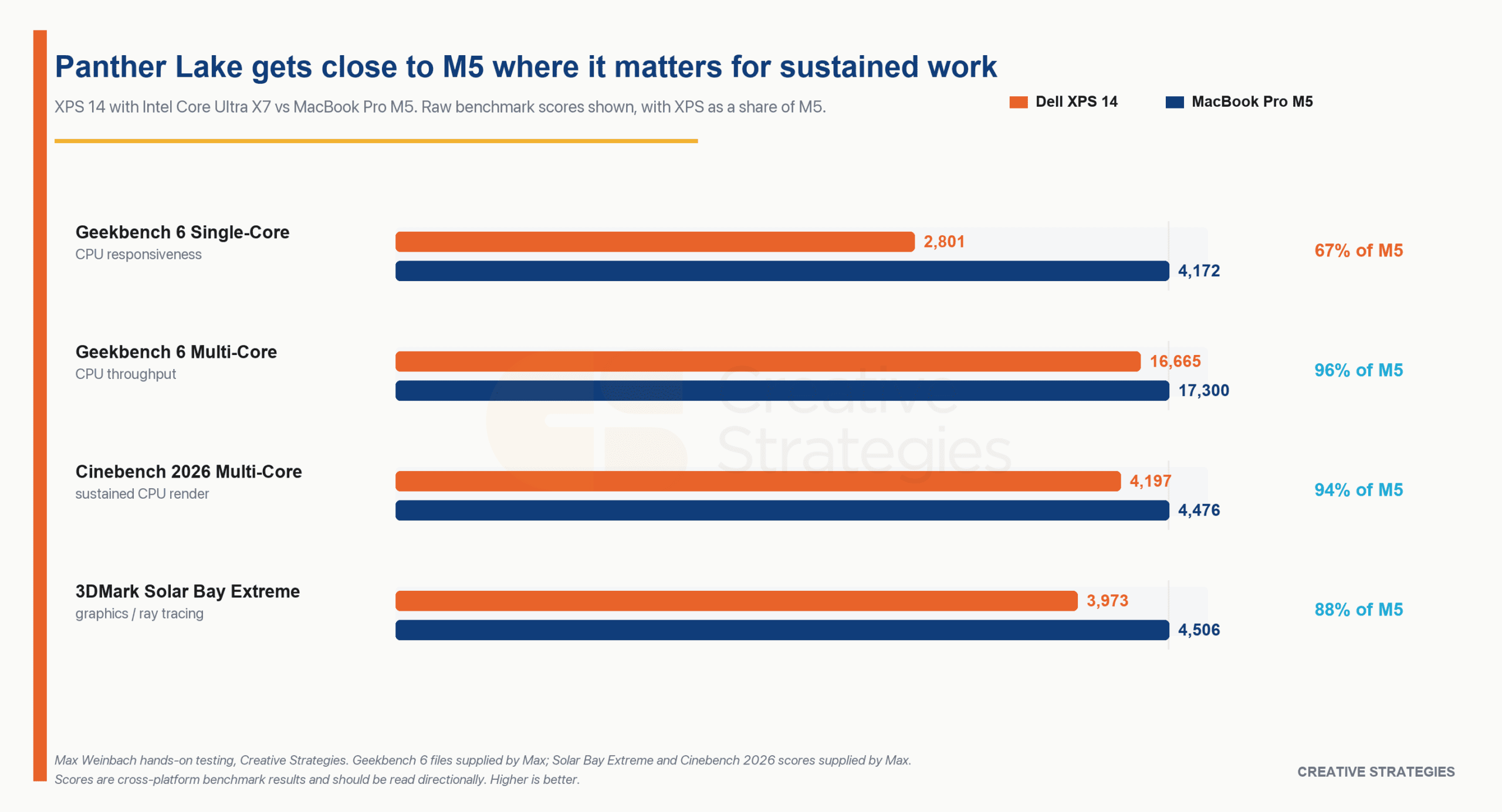
Let’s frame the part that matters. This is not as fast as my M5 Max, and it was never going to be (my M5 Max is also 2x the price). But it is close enough to a regular M5 in sustained CPU work and graphics that the laptop itself becomes the story, which is a great place to land.
The details to improve
I had to work to find these.
First, the keyboard doesn’t look perfectly flat. There is a slightly uneven look to it across the top, which is purely cosmetic and I never feel it while typing.
Second, the speakers are fine, but they aren’t great. My expectations are set by the Mac, which still has the best laptop speakers I’ve used. I wouldn’t pick this machine to watch a whole movie on.
Third, the haptic trackpad is good, but sometimes the multi-touch sensitivity isn’t as sharp as I’d like. I’d love to see them tighten that up.
For a machine in this class, that is an absurdly short list. I am running Windows on it, and Dell lists Ubuntu support as coming later if that is more your thing. I have no major complaints about the experience.
Truly, it’s a struggle to find things to improve or that I would want changed. I’ve tried.
Who it’s for, and where this goes
This is for people who want the best Windows laptop, not the most laptop for the money. Everyone wants the best. That does not mean the best is always worth paying for, and it definitely does not mean every person should buy the most expensive machine on the shelf. But if what you want is the premium Windows laptop that feels the most complete, this is it.
It’s expensive, and yes, you can find cheaper laptops with similar or even better numbers on paper. They are worse laptops. I can’t point to anything that gives you what the XPS gives you for less, and the stuff it does better is the stuff you feel every single day.
Would a workplace hand these out? Probably not; it’s a bit pricey for that, and Dell sells the Pro Premium line for exactly that job. That leaves the XPS as the consumer machine, which is what it should be.
From an analyst seat, people will want me to call market share or comment on what this means for the industry. I have no clue how the competition reacts over the next few months. What I’d bet on instead is the rule that has always held: good product matters, and good product does well. The XPS 14 is a remarkable product, arguably the best in its class on the Windows side. That tends to win regardless of what the market is doing.
The old rule that cheap laptops have to feel cheap is also on its way out. Build quality used to collapse at the low end because the chips were so slow you had to spend everything on performance, and the materials paid for it. With Intel’s Wildcat Lake and Qualcomm’s Snapdragon C platform, the cheap stuff is finally fast enough that the trade-off loosens. The floor is rising. But today, at the premium end, the XPS 14 is the one that’s set up the best.
It is, to put it plainly, dumb how good this thing is. No major complaints.